Handle the urgent call and the surprise behind the wall.
Plumbing jobs change once the wall is open. ServiceVisit lets you dispatch fast, track the parts on the truck, and get the customer's approval when the scope grows.
New job
The work is the easy part. Everything around it is where plumbers lose money.
“I opened the wall, found a corroded line, and quoted it from the truck by text. Half the time I forget to bill the extra.”
“An emergency call comes in while I'm on another job, and by the time I call back they've booked someone else.”
“Water heater flushes and annual checks are money I never go back for, because nothing reminds me to.”
Four things that change how the week goes.
Emergencies don't get lost
The call becomes a job in seconds, with the address and problem on it, and goes straight onto a technician's day.
Surprises get priced, not absorbed
When the wall opens and the job grows, the customer approves the new price online before more work happens.
Paid on site
Invoice from your phone when the job closes. The invoice matches what the customer approved.
Repeat work books itself
Turn a one-time repair into a maintenance plan, with the visits scheduled and billed for you.
A Tuesday, two ways.
Without ServiceVisit
- The call comes in and you write the address on your hand
- Extra work is quoted by text, and the customer argues it later
- The invoice is written that night and paid next month
- No one remembers the flush due in October
With ServiceVisit
- The call becomes a job and lands on the nearest technician
- Extra work is itemized and approved online first
- The invoice is paid by card at the door
- The plan books the October visit automatically
One burst pipe. Two phones. Everything that happens.
Watch what the technician sees and what the customer sees, from the first call to next year’s visit.
New job
Marcus’s Tuesday
Estimate
Checklist
Invoice
Plans
Estimate
Pay invoice
Plan offer
A burst pipe becomes a job in seconds, with the customer, the address and the problem on it.
You see who is free and nearby, and drop the visit onto their day.
It is a corroded line, not a fitting. The extra pipe and labor go on the job, and she approves on her phone.
A pressure reading, a shutoff test and a photo of the failed section stay on the job.
He invoices from the phone, and she pays by card at the door.
She took the yearly water heater flush, so October’s visit is scheduled and billed for you.
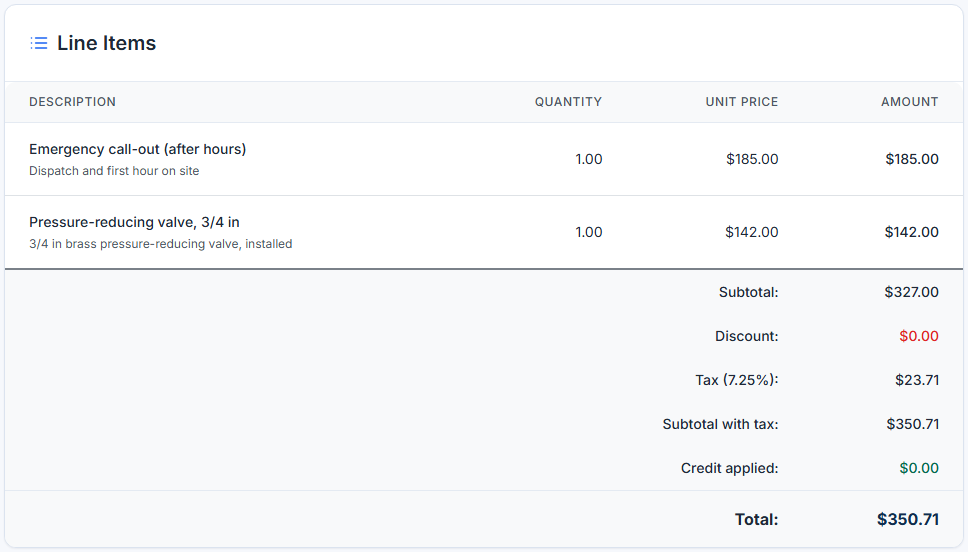
The estimate your customer approves
An after-hours call-out and a valve, priced on one estimate the customer approves from their phone.
Three leaks a plumbing business can close.
Extra work
Every add-on gets a line on the estimate and the invoice, so nothing is absorbed.
Slow payment
Paid by card on site, instead of an invoice that waits on the customer.
Plans
One repair becomes a yearly flush or inspection that runs without a reminder from you.
Put the urgent call first.
The schedule shows each technician's day, so an emergency lands on the person who can reach it and the rest of the day adjusts.
- A day view across your technicians
- Assign or reassign in a click
- Move a visit when an emergency comes in
Technician schedule
Know what is on the truck and what the customer agreed to.
Parts used on a job come out of inventory, and a change order records the customer's approval of extra work so the invoice matches what was agreed.
- Parts tracked in inventory
- Change orders customers approve online
- Invoices that match the approved work
Change order
Quote the job before the wall is open, and again after.
Send an estimate with optional items, revise it when the scope changes, and keep the history so the invoice matches what the customer agreed to.
- Optional items on estimates
- Revisions with history
- Invoices built from the approved estimate
Estimate
Every address and every past visit in one place.
Keep notes and photos for each customer, so a return visit starts from what the last plumber found.
- One history for each customer
- Notes and photos on every visit
- Follow-ups that do not get lost
Customer history
And also for plumbing
Estimates with revisions
Revise an estimate when the scope changes and keep the history.
Photos of the problem
Attach before and after photos to the job.
Payment on the spot
Send a payment link or take a card at the door.
Online booking
Let customers request a visit from your link, within the availability you set.
Service plans
Offer an annual inspection plan the customer accepts online.
Deposits
Ask for a deposit on a larger installation.
Good to know
- Inventory tracking is optional and set up only if you want it.
- A change order needs the customer's approval before the added work is billed.
- Permits and inspections stay with your local authority. Notes on the job can record the permit number.
- Online booking uses the availability you set.
Works for one truck or five.
Solo
You are the office, the technician and the owner. Nothing forces you into approval steps you don't need.
A small crew
Everyone sees their own day. You see all of it on one schedule.
Start small
Begin with jobs and invoices. Add plans and your online booking link when you are ready.
Before you try it.
I'm not technical. Will I be able to use this?
You add a customer, pick a service and send a job. The rest follows from there.
How to choose field service softwareI already use a spreadsheet or another app.
Start with a single job. Run it from the call to the payment, then bring the rest across when you are ready.
How to choose field service softwareCan I charge for an emergency call differently?
Yes. Each service has its own price, so emergency and standard work can be priced separately.
How to price service jobs profitablyWhat does it cost to try?
Start a free trial and set it up your way. A credit card is required to begin.
Other trades
HVAC
Tune-ups, diagnostics and maintenance plans.
Duct cleaning
Clear quotes, photo proof and repeat visits.
Electrical
Assessments, estimates and licensed staff.
Appliance repair
Diagnose, order the part, come back and close it.
Garage door
Same-day repairs and clear quotes.
Roofing
Assessments, approvals and larger-job payments.
Pest control
Recurring programs that bill themselves.
Cleaning
Repeatable standards across every crew.
Landscaping
Weekly crews and seasonal agreements.
Pool service
Weekly stops and recurring billing.
Locksmith
Fast dispatch and payment before you leave.
Handyman
Many small jobs, one tidy schedule.
See ServiceVisit in your trade.
Start a free trial and set it up for the way you work, or book a demo and we will tailor it with you. A credit card is required to begin a trial.
Examples and screens on this page are illustrative.