Take the call, get there and get paid on the spot.
Locksmith calls are urgent and often after hours. ServiceVisit helps you capture them quickly, dispatch the nearest technician and take payment at the door.
New job
Locksmith calls are urgent, and the customer decides in seconds who to trust.
“A lockout call comes in and I'm across town on another job.”
“I quote on the phone and the price changes on arrival.”
“I rekey a property and never follow up on the others.”
Four things that make an urgent call easier.
The call is a job
Location and lock type are on the job before you drive.
The nearest technician goes
See each technician's day and send the right one.
The price is agreed first
Labor and hardware go on an estimate the customer approves.
You're paid on the spot
Invoice from your phone and take the payment.
A lockout call, two ways.
Without ServiceVisit
- The call is a missed message
- The price changes on arrival
- Payment is cash or a promise
- No follow-up
With ServiceVisit
- The call is a job on the nearest technician's day
- The price is agreed on an estimate
- Payment is by card at the door
- A plan schedules the next check
One lockout, from the call to the card payment in under an hour.
Locksmith calls are urgent and usually close in one visit. Follow one from the first ring.
New job
Cal’s night
Lock work
Estimate
Invoice
Plans
Estimate
Pay invoice
Plan offer
A lockout becomes a job while the customer is still on the phone, with where she is and what is locked.
You see who is nearest and open, and send them.
The lock type and the work are recorded, with a photo of the finished lock.
She also wants both locks rekeyed. The price is on an estimate she approves from her phone.
He closes the job and she pays by card on the doorstep.
A property manager she knows takes a quarterly lock check, scheduled and billed for you.
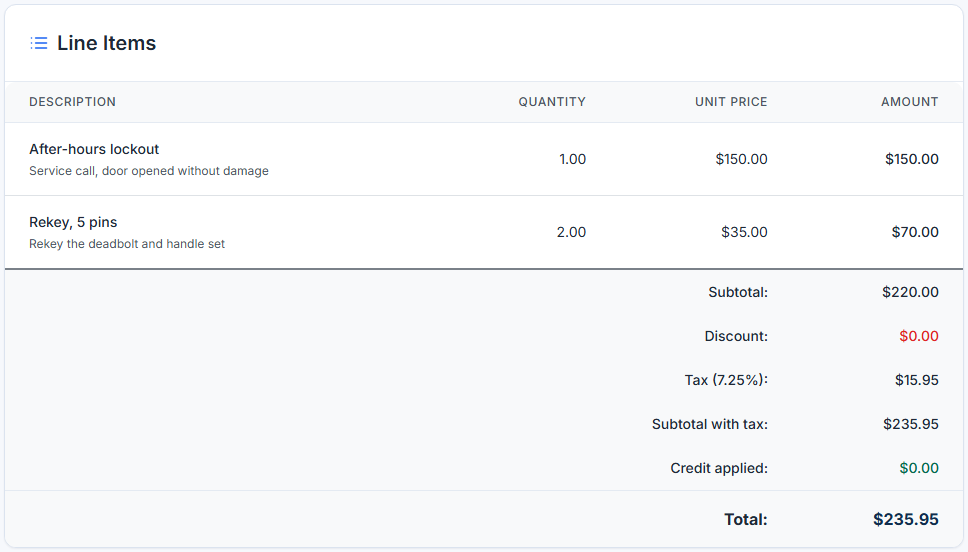
The estimate your customer approves
A lockout call and a rekey, priced as separate lines.
Three leaks a locksmith business can close.
Missed calls
Every call becomes a job.
Price changes
Labor and hardware are agreed on the estimate.
Property work
Recurring lock checks become scheduled visits.
Capture it once and send the right person.
A quick-add form gets the job on the schedule while you talk, and the technician sees the address, the problem and the priority.
- Quick-add a job during the call
- Assign the nearest technician
- Address and problem on the job
Dispatch
Agree the price and take payment right there.
Send the estimate or invoice to the customer's phone, and take a card payment on the spot.
- Approve the price on a phone
- Pay by card on site
- Send the receipt to the customer
Invoice
Quote lockouts and installs the same way.
Send an estimate with the repair and the replacement as optional items, and let the customer pick and approve it from their phone.
- Optional items on estimates
- Online customer approval
- Revisions if the job changes
Estimate
Keep repeat and business customers organized.
Keep each customer's history, locations and notes in one place, and bill repeat work on an invoice you send.
- One record for each customer
- Notes on each job
- Invoices for repeat customers
Customer
And also for locksmith
Photos
Photograph the work and the finished lock.
Online booking
Let non-urgent customers book rekeys.
Repeat customers
Keep each customer's jobs and history in one place.
Customer messages
Let the customer know you are on the way by text or email.
Dispatch the day
See each technician's day and assign the next call.
Payment links
Send a payment link when the work is done.
Good to know
- Identity and ownership checks at the door follow your own procedure.
- Payments run through your own connected payment account.
- Online booking uses the availability you set.
- Notes on a job are internal to your company.
Works for one van or a small fleet.
Solo
You take the call, drive and bill, all from your phone.
A small fleet
See who is nearest and free before you dispatch.
Start small
Begin with jobs and invoices, then add plans for property managers.
Before you try it.
Can I use this from my phone?
Yes. The job, the estimate and the invoice are available on a phone.
Can I price lockouts, rekeys and installs separately?
Yes. Each is its own service.
How to price service jobs profitablyCan customers pay on the spot?
Yes. You can take a card payment when you close the job.
How to get customers to pay fasterWhat does it cost to try?
Start a free trial and set it up your way. A credit card is required to begin.
Other trades
HVAC
Tune-ups, diagnostics and maintenance plans.
Duct cleaning
Clear quotes, photo proof and repeat visits.
Plumbing
Urgent dispatch, parts and change orders.
Electrical
Assessments, estimates and licensed staff.
Appliance repair
Diagnose, order the part, come back and close it.
Garage door
Same-day repairs and clear quotes.
Roofing
Assessments, approvals and larger-job payments.
Pest control
Recurring programs that bill themselves.
Cleaning
Repeatable standards across every crew.
Landscaping
Weekly crews and seasonal agreements.
Pool service
Weekly stops and recurring billing.
Handyman
Many small jobs, one tidy schedule.
See ServiceVisit in your trade.
Start a free trial and set it up for the way you work, or book a demo and we will tailor it with you. A credit card is required to begin a trial.
Examples and screens on this page are illustrative.