Keep the repair moving while you wait for the part.
Appliance repair often takes two visits: one to diagnose and one to fix. ServiceVisit keeps both on the same job so the second visit starts with everything you learned on the first.
Job
The repair is split across two visits, and the part order is where it goes wrong.
“I diagnose on Monday, order a part, and by Thursday I've forgotten the exact model.”
“The customer balks at a price after I've already ordered the part.”
“Most repairs never turn into a plan because I don't follow up.”
Four things that keep a two-visit repair together.
The model and symptom are on the job
You arrive knowing the appliance and the fault, and the same job carries through to the return visit.
The diagnosis is consistent
A checklist with a photo of the data plate means the right part gets ordered.
The customer agrees before the part is ordered
Part and labor are on an estimate they approve online.
Repairs become relationships
Offer a service plan after the repair and the visits schedule themselves.
A washer repair, two ways.
Without ServiceVisit
- The model number is on a sticky note somewhere
- The part is ordered before the customer agrees
- The second visit starts from scratch
- No one follows up
With ServiceVisit
- The model, serial and symptom are on the job
- The customer approves the part and labor first
- The return visit opens the same job
- A plan offer follows the repair
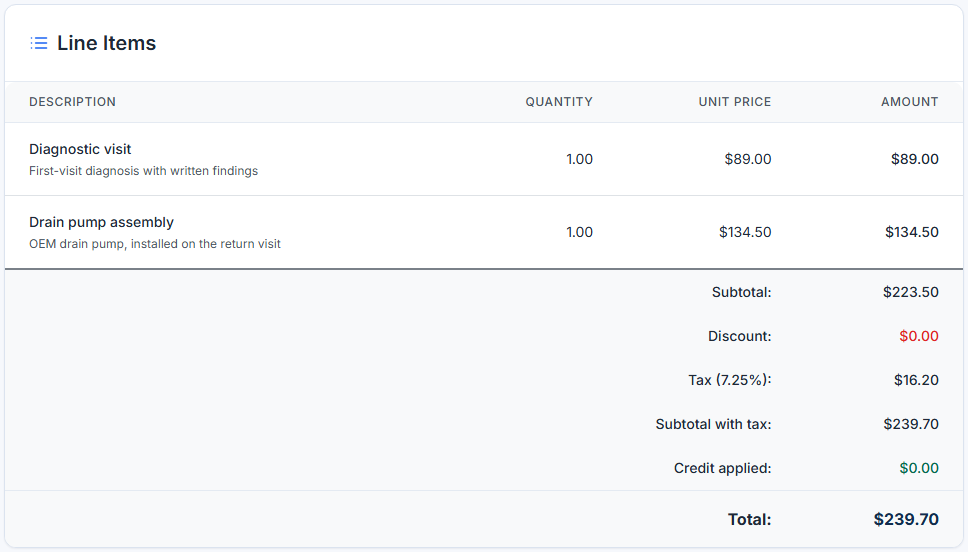
One washer that will not drain, across two visits.
Appliance repair is usually two trips. Follow the diagnosis, the part order and the return visit on one job.
New job
Sam’s Monday
Washer diagnostic
Estimate
Invoice
Plans
Estimate
Pay invoice
Plan offer
The appliance, the model and the fault are on the job before anyone drives out.
The visit lands on a technician with the time, and the rest of the day stays in view.
The same checks every time, and a photo of the model plate so the right part gets ordered.
She sees the part and the labor, and can decide it is not worth repairing before anything is ordered.
The return visit opens the same job, finishes the repair and takes the payment.
After the repair she took a protection plan, with a yearly check scheduled for you.
The estimate your customer approves
The diagnostic visit and the part for the return trip, on one estimate.
Three leaks an appliance repair business can close.
Lost model details
A photo of the data plate stays with the job.
Parts ordered on trust
The customer approves the estimate before you order.
One-off repairs
A plan after the repair keeps the customer on your schedule.
Do not start over on the second visit.
The diagnostic findings, photos and approved estimate stay on the job, so whoever returns with the part already knows what to do.
- Multiple visits on one job
- Photos and notes carried forward
- Customer approval recorded
Visits
Know what you have and what you ordered.
Track the parts you stock, and use them on the job so the invoice and your counts agree.
- Parts tracked in inventory
- Parts used recorded on the job
- Counts that stay current
Inventory
Price the diagnostic and the repair the way you work.
Charge a diagnostic fee, then quote the part and labor on an estimate the customer approves. Use flat-rate or hourly pricing, whichever fits the job.
- Flat-rate and hourly pricing
- Estimates the customer approves
- Diagnostic fee and repair on one job
Estimate
Remember the make, the model and the history.
Notes and photos of the model plate stay with the customer, so a repeat call starts from what you already know.
- Model and serial notes on the job
- Photos with every visit
- A history for each customer
Customer record
And also for appliance repair
Flat-rate and hourly pricing
Price a diagnostic visit and the repair the way you already do.
Payment methods on file
Keep a card on file for the second visit.
Customer follow-up
Note the follow-up and send the customer the next step.
Online booking
Let customers request a visit from your link, within the availability you set.
Customer messages
Tell the customer when the return visit is booked.
Deposits
Ask for a deposit before ordering a costly part.
Good to know
- Inventory tracking is optional.
- Warranty claims with a manufacturer are handled outside ServiceVisit.
- Make and model are recorded in job notes and photos. ServiceVisit does not look up parts for you.
- Online booking uses the availability you set.
Works for a one-van shop or a small team.
Solo
You diagnose, order and repair. The job holds every step.
A small team
Technicians see their own days, and you see the whole schedule.
Start small
Begin with jobs, estimates and invoices, then add plans.
Before you try it.
Can one job cover both visits?
Yes. The return visit opens the same job, so the diagnosis and the estimate are already there.
Work order management guideCan I charge a diagnostic fee?
Yes. A diagnostic can be its own service with its own price.
How to price service jobs profitablyCan the customer decline the repair?
Yes. They can decline the estimate and the diagnostic record stays on the job.
How to write a service estimateWhat does it cost to try?
Start a free trial and set it up your way. A credit card is required to begin.
Other trades
HVAC
Tune-ups, diagnostics and maintenance plans.
Duct cleaning
Clear quotes, photo proof and repeat visits.
Plumbing
Urgent dispatch, parts and change orders.
Electrical
Assessments, estimates and licensed staff.
Garage door
Same-day repairs and clear quotes.
Roofing
Assessments, approvals and larger-job payments.
Pest control
Recurring programs that bill themselves.
Cleaning
Repeatable standards across every crew.
Landscaping
Weekly crews and seasonal agreements.
Pool service
Weekly stops and recurring billing.
Locksmith
Fast dispatch and payment before you leave.
Handyman
Many small jobs, one tidy schedule.
See ServiceVisit in your trade.
Start a free trial and set it up for the way you work, or book a demo and we will tailor it with you. A credit card is required to begin a trial.
Examples and screens on this page are illustrative.