Keep a record of what you cleaned, then keep customers on the schedule.
Duct cleaning is work most customers never see. ServiceVisit lets you quote clearly, keep photo records of what you found and did, and bring customers back on a schedule they choose.

Estimate
Customers can't see inside their ducts, so you have to prove the value.
“I clean for four hours and the customer has nothing to show for it but my word.”
“A big job lands on a day that is already half booked.”
“People only need this every few years, and I never call them back in time.”
Four things that make the job easier to sell and repeat.
You arrive knowing the size of the job
Systems, vents and property type are on the job from the first call, so the quote and the time are right.
What you found is on record
A checklist with required photos and notes means the before and after are written down, not argued about.
Add-ons are priced before they are done
Dryer vents and sanitizing go on an estimate the customer approves online.
The next cleaning is on the calendar
A plan or a recurring visit means you contact the customer before they think of you.
A whole-home cleaning day, two ways.
Without ServiceVisit
- The job grows on site and the price is agreed on the doorstep
- No record of what the ducts looked like beforehand
- The invoice is sent a week later
- Nobody calls back in three years
With ServiceVisit
- Size and scope were on the job when you booked it
- The checklist and photos record the before and after
- The invoice is paid by card when you finish
- The next visit is already scheduled
One whole-home cleaning, and the next one already on the calendar.
A duct cleaning is sold on what the customer cannot see. Follow how the record, the add-ons and the follow-up work.
New job
Crew A, Thursday
Inspection
Estimate
Invoice
Plans
Estimate
Pay invoice
Plan offer
The size of the job is on it from the first call, so the quote and the hours are right.
A four-hour clean goes onto a day that can hold it, with the crew’s other bookings in view.
Each run and the air handler are checked and photographed, so the record of what you found stays on the job.
A dryer vent and a sanitizing treatment go on an estimate she approves online.
The after photos are on the job, and the invoice is paid by card before the crew leaves.
She took a yearly dryer vent visit, so the next one is scheduled before she thinks of it.
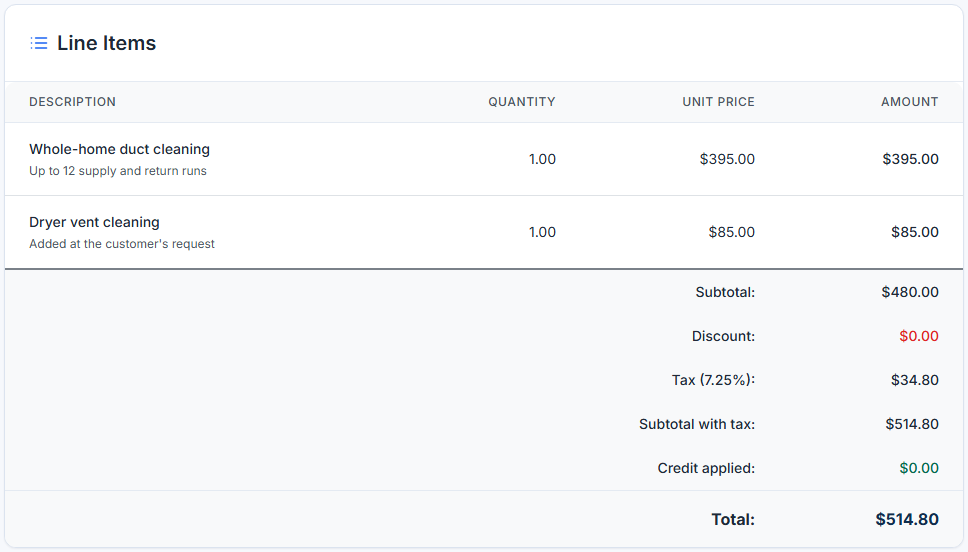
The estimate your customer approves
A whole-home clean with the dryer vent added as its own line.
Three leaks a duct cleaning business can close.
Add-on services
Dryer vents and treatments become line items on the estimate, not favors.
No proof of work
Checklist answers and photos stay with the job as the record of what was done.
The long gap between jobs
A recurring visit at the interval you recommend brings the customer back.
Let the customer pick the scope.
Offer the whole home, a single system, or add a dryer vent as an option on one estimate. The customer approves from their phone.
- Optional items on estimates
- Online customer approval
- Revisions if the scope changes
Options
Photos that show what was done.
Attach before and after photos to the job. They stay with the job and the customer's history, so you can show what you found and what you did if a customer asks.
- Photos on every visit
- Reusable checklists
- Notes saved with the customer
Job photos
A checklist for each part of the system.
Write your own checklist for the way your company cleans: supply and return vents, main trunks, the furnace or air handler, and the dryer vent. Every technician works through the same steps, and the completed checklist stays with the job.
- Checklist templates you write
- Separate templates for different property types
- Findings noted on the job as the technician goes
Duct cleaning checklist
Turn a one-time clean into a regular one.
Most customers book duct cleaning every few years, so the next visit is easy to forget. Set a recurring visit on the interval the customer chooses, and the next job lands on the schedule for you.
- Recurring visits on the customer's interval
- Service plans a customer accepts online
- Notes and photos from past visits in one history
Return visit
Bill the job you quoted.
The invoice comes from the approved estimate, so the price the customer agreed to is the price they are billed. Send a payment link or take a card when the work is done, and ask for a deposit on larger jobs.
- Invoices built from the approved estimate
- Payment link or card at the door
- Deposits for larger jobs
Invoice
And also for duct cleaning
Recurring service
Offer a repeat visit on the schedule the customer picks.
Payment on site
Send a payment link or take a card when the work is done.
Follow-up
Note a follow-up so the next visit is not forgotten.
Online booking
Let customers request a visit from your booking link.
Customer history
See every past visit, photo and note for a customer before you arrive.
Crew scheduling
Assign a crew to each job and move visits when a day runs long.
Parts and supplies
Track supplies such as vent covers in inventory, if you choose to.
Estimates with revisions
Revise the quote if the technician finds more to clean, and keep the history.
Good to know
- Recurring visits are set per customer, since most customers book duct cleaning only occasionally.
- Checklist templates and photo requirements are yours to define, so they match how your company works.
- Standards and certifications for duct cleaning stay with your own company.
- Inventory tracking is optional and set up only if you want it.
- Payments run through your own connected payment account.
Works for one crew or several.
Solo
You book, clean and invoice. The job holds everything in one place.
Two or three crews
See each crew's hours across the week, so a long job doesn't land on a full day.
Start small
Begin with jobs and invoices, then add recurring visits for dryer vents and yearly customers.
Before you try it.
Do I need to be technical to use the checklist?
No. It is a list of steps you tick off, with a note or a photo where you need one.
How to choose field service softwareCan I price a whole-home clean and a dryer vent separately?
Yes. Each service has its own price and can be added to the same job.
How to price service jobs profitablyCan I keep a record of what I found?
Yes. The checklist answers, readings and photos stay with the job as the record of what you found and did.
Work order management guideWhat does it cost to try?
Start a free trial and set it up your way. A credit card is required to begin.
Other trades
HVAC
Tune-ups, diagnostics and maintenance plans.
Plumbing
Urgent dispatch, parts and change orders.
Electrical
Assessments, estimates and licensed staff.
Appliance repair
Diagnose, order the part, come back and close it.
Garage door
Same-day repairs and clear quotes.
Roofing
Assessments, approvals and larger-job payments.
Pest control
Recurring programs that bill themselves.
Cleaning
Repeatable standards across every crew.
Landscaping
Weekly crews and seasonal agreements.
Pool service
Weekly stops and recurring billing.
Locksmith
Fast dispatch and payment before you leave.
Handyman
Many small jobs, one tidy schedule.
See ServiceVisit in your trade.
Start a free trial and set it up for the way you work, or book a demo and we will tailor it with you. A credit card is required to begin a trial.
Examples and screens on this page are illustrative.