Keep the weekly crews moving and the seasonal work billed.
Landscaping runs on routes and seasons. ServiceVisit schedules your crews, bills recurring work and lets customers accept a seasonal plan online.

Weekly route
Weekly routes and seasonal projects live on different pages, and neither gets billed on time.
“The mowing route is in my head and the mulch job is on a sticky note.”
“I do the extra planting and forget to add it to the monthly bill.”
“Every spring I have to rebuild the customer list.”
Four things that keep crews moving and work billed.
Routes and projects on one schedule
Weekly visits and one-off jobs sit together, with each crew's hours visible.
Each visit is on record
Checklists and photos show what was done at each property.
Add-ons get a price
Mulch and planting go on an estimate the customer approves.
The season renews itself
Seasonal plans bring customers back without a new round of calls.
A busy spring week, two ways.
Without ServiceVisit
- Routes are in your head
- Extras are done and forgotten
- Monthly invoices are rebuilt from memory
- The customer list is rebuilt every spring
With ServiceVisit
- Routes are on the schedule
- Extras are on the estimate and the invoice
- Monthly invoices match the visits
- Seasonal plans renew
One lawn account, from spring to the fall cleanup.
Landscaping mixes weekly routes with seasonal projects. Follow how both stay on one schedule and one monthly bill.
New job
Crew 2, Thursday
Visit checklist
Estimate
Monthly invoice
Plans
Estimate
Pay invoice
Plan offer
The property and the weekly service are on the job, with what is included written down.
Weekly visits land on a crew’s route, and one-off projects fit around them.
Each visit has a checklist, and a photo of the finished beds stays on the job.
He asks for fresh mulch. It goes on an estimate and he approves it from his phone.
The month’s visits and the mulch job come out on one invoice, paid by card.
He took the spring and fall cleanups as a plan, so they are scheduled and billed for you.
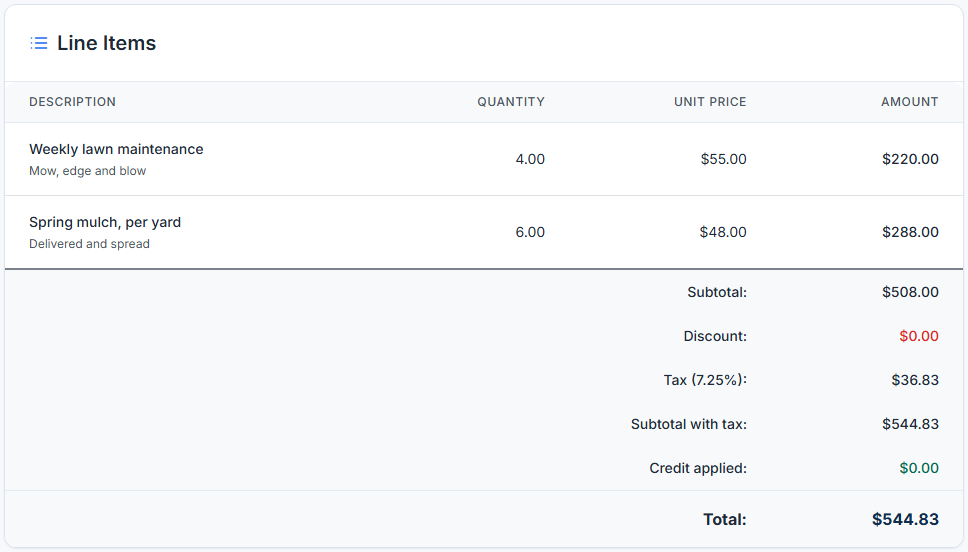
The estimate your customer approves
Weekly maintenance and a seasonal mulch job, each priced on its own line.
Three leaks a landscaping business can close.
Extra planting
Add-ons become line items before the work.
Monthly billing
Invoices match the visits that happened.
Seasonal plans
Spring and fall cleanups are scheduled for you.
A schedule for every crew and every location.
Plan the week by crew, move a stop when the weather turns, and keep more than one location on the same schedule.
- Crew scheduling across locations
- Recurring weekly stops
- Move a visit in a click
Crew 2, Monday
Seasonal plans customers accept.
Offer a seasonal agreement, have the customer accept it online, and bill it on a recurring invoice.
- Service plans customers accept
- Recurring invoices
- Add-on work quoted separately
Season plan
Quote the patio, planting or cleanup as its own job.
Send an estimate for one-time work, take a deposit before ordering materials, and invoice from the approved estimate.
- Optional items on estimates
- Deposits before materials
- Photos on the job
Project
Keep property notes with the customer.
Gate details, pets and special instructions stay on the customer's record, so any crew arriving knows them.
- Notes for each customer
- Notes and photos on each visit
- Follow-ups that do not get lost
Notes
And also for landscaping
Estimates
Quote one-time projects such as a patio or planting.
Photos
Show before and after.
Payment methods on file
Bill the saved card each month.
Customer messages
Tell the customer the crew is coming by text or email.
Online booking
Let new customers request an estimate from your link.
Change orders
Record added work for the customer to approve.
Good to know
- Route optimization is not part of ServiceVisit. You order the stops yourself.
- Seasonal plans use the dates and prices you set.
- Crew day views show each crew's stops. They do not reorder them.
- Online booking uses the availability you set.
Works for one crew or several.
One crew
You run the route and the books. The schedule keeps it straight.
Several crews
See each crew's week at a glance.
Start small
Begin with jobs and invoices, then add seasonal plans.
Before you try it.
Can I run weekly routes and one-off projects together?
Yes. Both go on the same schedule.
Service agreements and maintenance plansCan I bill monthly?
Yes. Invoice each month from the work done.
Service agreements and maintenance plansCan I price add-ons like mulch?
Yes. Add them as line items on an estimate.
How to price service jobs profitablyWhat does it cost to try?
Start a free trial and set it up your way. A credit card is required to begin.
Other trades
HVAC
Tune-ups, diagnostics and maintenance plans.
Duct cleaning
Clear quotes, photo proof and repeat visits.
Plumbing
Urgent dispatch, parts and change orders.
Electrical
Assessments, estimates and licensed staff.
Appliance repair
Diagnose, order the part, come back and close it.
Garage door
Same-day repairs and clear quotes.
Roofing
Assessments, approvals and larger-job payments.
Pest control
Recurring programs that bill themselves.
Cleaning
Repeatable standards across every crew.
Pool service
Weekly stops and recurring billing.
Locksmith
Fast dispatch and payment before you leave.
Handyman
Many small jobs, one tidy schedule.
See ServiceVisit in your trade.
Start a free trial and set it up for the way you work, or book a demo and we will tailor it with you. A credit card is required to begin a trial.
Examples and screens on this page are illustrative.