Document what you find, then quote it with confidence.
Electrical work starts with an assessment. ServiceVisit carries the findings into the estimate and the work order, so nothing is retyped between the visit and the invoice.
Assessment
Electrical work depends on what's behind the wall, and the paper trail rarely keeps up.
“I look at a panel, remember what's in it, and price from memory. Then it gets argued.”
“A phased job drags on and I lose track of what was approved and what wasn't.”
“Inspections and safety checks are easy to sell, but I never follow up.”
Four things that make electrical jobs cleaner.
What you found is written down
Panel details, readings and photos are on the job before you quote.
Quotes come from the findings
Labor and materials go on an estimate the customer approves online.
The invoice matches the approval
No argument at the end, because the scope was agreed in writing first.
Follow-up work gets scheduled
Inspections and the next phase go on the calendar instead of in your head.
A panel upgrade, two ways.
Without ServiceVisit
- You price from memory after a quick look
- The customer adds a circuit midway and the price drifts
- The final invoice doesn't match what was said
- No one books the inspection a year later
With ServiceVisit
- The panel's condition is recorded with photos before you quote
- Added work goes on the estimate and is approved first
- The invoice follows the approved scope
- A plan schedules the next inspection
One panel upgrade, from the first look to the safety check.
Electrical work starts with finding out what is there. Follow the assessment, the written quote and the install.
New job
Lena’s week
Panel assessment
Estimate
Invoice
Plans
Estimate
Pay invoice
Plan offer
A request for a bigger panel and an EV charger becomes a job with the scope written down.
The visit goes where the technician has the hours, with the rest of their week in view.
Panel capacity, breaker condition and grounding are recorded, with the photos the checklist requires.
The findings become labor and material lines. He adds the EV circuit and approves it all online.
After the install, the invoice matches what was approved and is paid by card.
A yearly safety check is scheduled and billed, so inspections are not forgotten.
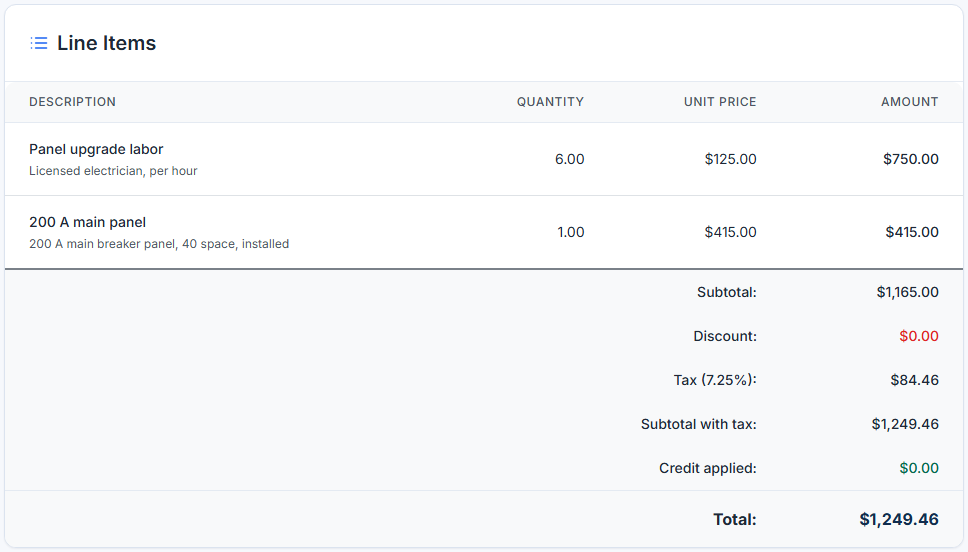
The estimate your customer approves
Panel labor and the panel itself, itemized so the customer sees exactly what they are approving.
Three leaks an electrical business can close.
Guessing from memory
Findings and photos on the job mean the estimate reflects what is actually there.
Scope creep
Every added circuit is a line the customer approves, not a favor.
Inspections
Recurring safety checks become scheduled visits.
One record from the first look to the final invoice.
The assessment, the estimate and the work order stay connected, so the crew sees what was found and what the customer agreed to.
- Assessments that document findings
- Estimates with revisions
- Approved estimates become work orders
Job flow
Send the right person.
Track which staff hold the qualifications a job needs, so licensed work goes to licensed people.
- Qualification tracking for staff
- Schedule by skill and availability
- A record of who did the work
Qualifications
Quote it in options and get paid in stages.
Offer optional items on one estimate, ask for a deposit before ordering materials, and offer an installment plan on a larger project.
- Optional items on estimates
- Deposits before materials
- Installment plans
Payment plan
Keep the evidence with the job.
Checklists, panel photos and notes stay on the work order, so you can show what was found and what was done long after the visit.
- Reusable checklists
- Photos and notes on every visit
- A record of who did the work
Panel checklist
And also for electrical
Deposits
Collect a deposit before ordering materials.
Photos and notes
Keep panel photos and notes with the job.
Installment plans
Offer a payment plan on a larger project.
Online booking
Let customers request a visit from your link, within the availability you set.
Customer messages
Confirm the visit by text or email.
Service plans
Offer a recurring inspection plan the customer accepts online.
Good to know
- ServiceVisit tracks the qualifications you enter. It does not verify licenses for you.
- Permit paperwork stays with your local authority. Notes on the job can record the permit number.
- Checklist templates are yours to write, so they match the inspections you perform.
- Payments run through your own connected payment account.
Works for a one-person shop or a small crew.
Solo
You are the electrician and the office. The job record keeps everything together.
A small crew
Install days and assessment days sit on one schedule.
Start small
Begin with assessments, estimates and invoices, then add plans.
Before you try it.
Can I record panel details and photos?
Yes. The checklist asks for the readings and photos you want on every assessment.
Work order management guideCan customers approve a quote online?
Yes. The estimate is sent to them, and their approval is kept with the job.
How to estimate electrical workI phase larger jobs. Does that work?
Yes. Schedule a follow-up visit on the same job and invoice each stage as you go.
How to get customers to pay fasterWhat does it cost to try?
Start a free trial and set it up your way. A credit card is required to begin.
Other trades
HVAC
Tune-ups, diagnostics and maintenance plans.
Duct cleaning
Clear quotes, photo proof and repeat visits.
Plumbing
Urgent dispatch, parts and change orders.
Appliance repair
Diagnose, order the part, come back and close it.
Garage door
Same-day repairs and clear quotes.
Roofing
Assessments, approvals and larger-job payments.
Pest control
Recurring programs that bill themselves.
Cleaning
Repeatable standards across every crew.
Landscaping
Weekly crews and seasonal agreements.
Pool service
Weekly stops and recurring billing.
Locksmith
Fast dispatch and payment before you leave.
Handyman
Many small jobs, one tidy schedule.
See ServiceVisit in your trade.
Start a free trial and set it up for the way you work, or book a demo and we will tailor it with you. A credit card is required to begin a trial.
Examples and screens on this page are illustrative.